
Query Service Add-on
Alation Cloud Service Applies to Alation Cloud Service instances of Alation
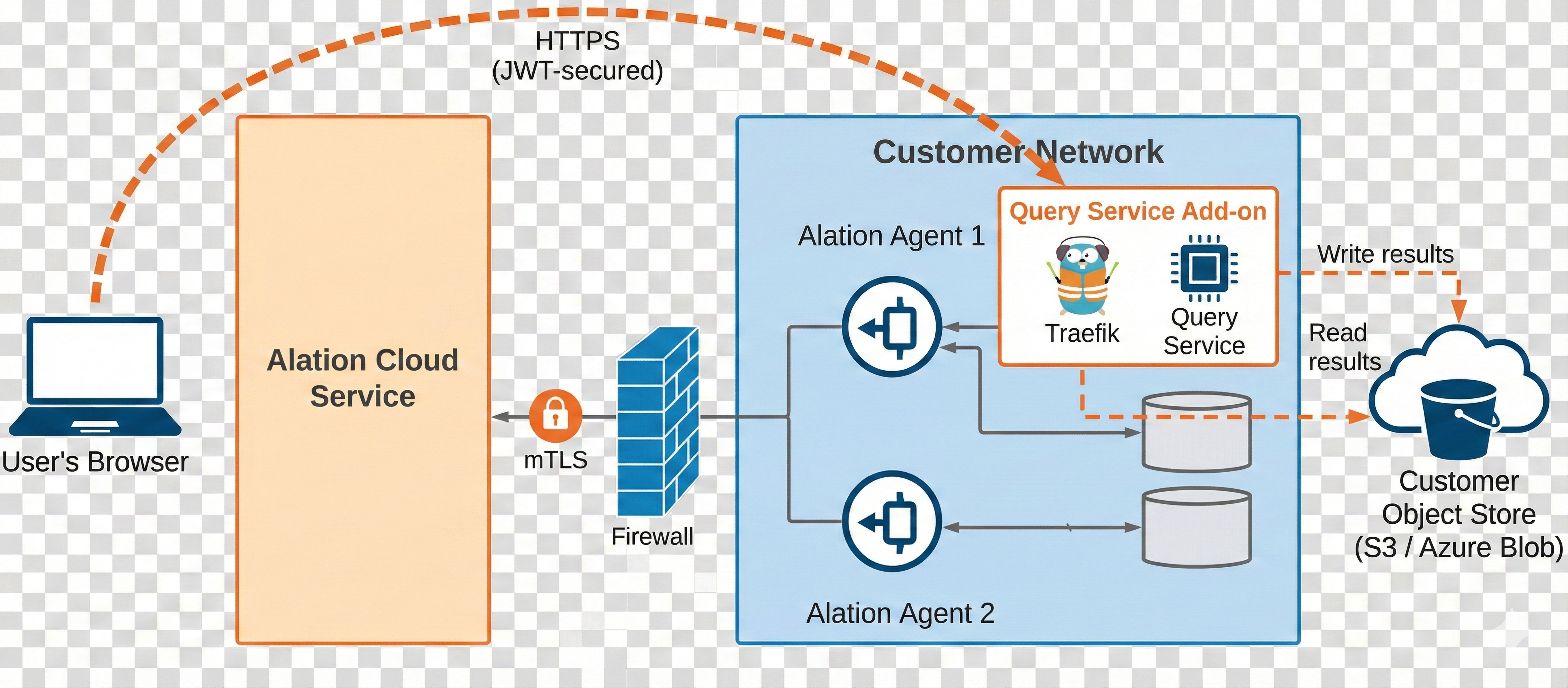
The Zero Data feature lets you execute queries, sampling, and profiling through an on-premises Alation Agent. No query result data traverses or gets stored in Alation Cloud Service. Instead, the Agent writes query results to your own object store (AWS S3 or Azure Blob Storage). Your browser retrieves results directly through a secure gateway running on the Agent.
The Query Service Add-on is an optional component that you install on the Alation Agent to enable the Zero Data feature. With this add-on installed and configured, the following capabilities run on-premises through the Agent:
Compose – Query execution with results stored in your object store
Query Forms – Parameterized query execution
Scheduled Queries – Automated recurring queries
Sampling – Table data sampling
Profiling – Column data profiling
Note
The Query Service Add-on is entirely optional. If you do not install it, all existing Compose, sampling, and profiling behavior remains unchanged.
Architecture
The following diagram shows how the Zero Data data flow differs from the standard Agent architecture. The orange dashed arrows represent the new Zero Data path, where your browser retrieves query results directly from the Agent’s gateway and your object store. The existing gray arrows for metadata and catalog operations are unchanged.
Prerequisites
To use the Zero Data feature, you must meet the following requirements:
You must be on Alation Cloud Service version 2026.4 or later.
You must have the Query Service Add-on installed on the Alation Agent. See Query Service Add-on for more information.
You must have the Alation Agent version 1.8.16 or later installed.
You must have a supported object store configured:
AWS S3 – An S3 bucket with the appropriate IAM permissions.
Azure Blob Storage – A storage account and container with the appropriate OIDC federated credentials.
You must configure the Agent with an ingress hostname, TLS certificate, and TLS key for the Zero Data gateway. See Manage the Query Service Add-on for details.
The user’s browser must be able to reach the Agent’s Zero Data ingress endpoint directly. See Alation’s IP Addresses for Allow Lists for network requirements.
The Query Service Add-on is supported on Agents in either connection mode. If the Agent is in polling mode, all Zero Data requirements still apply unchanged, and the user’s browser must still be able to reach the Agent’s Zero Data ingress endpoint directly. See Agent Polling Mode.
Getting Started
For help installing, upgrading, and managing the Query Service Add-on, see: