
Alation Consumption Unit (ACU) Usage
Alation Cloud Service Applies to Alation Cloud Service instances of Alation
An Alation Consumption Unit (ACU) is Alation’s single currency for measuring how you use its AI-powered products. Instead of buying seats, per-table subscriptions, or separate product tiers, you purchase a pool of ACUs. Every action you take across Alation’s five consumption-priced products draws from that one shared pool.
Only actions that deliver AI-generated value to your organization are metered. Passive activities, such as browsing, searching, reading, and manual edits, are always free.
AI-generated value is calculated as leveraging AI to deliver any output. For example, using AI to automatically create a column description based on its title. Since generating an output from AI consumes tokens, we will meter this action and charge based on the number of tokens consumed in terms of Alation Consumption Units (ACUs).
Previously, each Alation product was priced independently, which created procurement and flexibility challenges. Adding a second product meant a new negotiation and budget request, and unused capacity on one product could not be applied elsewhere. The ACU model solves this by allowing one flexible pool to fund all in-scope products. Capacity flows freely where your team actually uses it, and you are charged only for the AI-generated value your team receives.
The table below shows exactly what is and is not metered.
Products in Scope and Metering Rates
The ACU model currently applies to five Alation products. The products and their metered rates are:
Job |
Products |
Unit of Measure |
ACU Rate |
|---|---|---|---|
Curate |
Curation Automation |
Per AI field write |
0.05 |
Curate |
Data Product Marketplace |
Per AI field write |
0.05 |
Validate |
Data Quality |
Per check run |
0.075 |
Consume — Chat |
Data Product Marketplace |
Per message |
0.50 |
Consume — Export |
Data Product Marketplace |
Per export |
0.50 |
Consume — Agent |
Agent Studio |
Per call / tool invocation |
0.25 |
Govern — CDM |
Critical Data Manager |
Per active CDE / Data Consumption per day |
1.0 |
Govern - Marketplace Assets |
Data Product Marketplace |
Per listed DP |
1.0 |
Metered Action Details
A metered action occurs when the system actively leverages an AI model or executes a paid compute process to generate an output. Specifically:
Curation Automation: An action is metered each time the AI agent successfully generates and writes a value to a catalog field (an “AI field write”).
Data Quality: An action is metered each time a Data Quality check run is executed.
Data Product Marketplace — Chat: An action is metered for each user prompt or message processed by Data Product Marketplace Chat or the corresponding API.
Data Product Marketplace — Export: An action is metered each time a Data Product is exported, whether triggered from the UI or via the API.
Data Product Marketplace — Assets: An action is metered per listed Data Product or Data Consumption per day.
Agent Studio: An action is metered for each distinct LLM call or tool invocation triggered by an agent during a workflow.
Critical Data Manager: An action is metered for each Critical Data Element (CDE) or Data Consumption in Draft, In Review, or Certified status, per day. Those in Candidate status (AI-suggestions awaiting review) or in Deleted/Deprecated status are not metered.
Note
The Critical Data Manager rate has been in effect since July 1, 2026.
Critical Data Manager (CDM) Billing Details
As of July 1, 2026, Critical Data Manager (CDM) consumption is metered under the ACU model. Free ACUs can be applied to CDM consumption in the same manner as the other in-scope products.
Rate: 1 ACU per Critical Object per day.
Critical Object: A Critical Data Element (CDE) or a Data Consumption (DC). Physical Data Elements (PDEs) are excluded from metering.
Billing cadence: ACUs are deducted daily for each active Critical Object, independent of query volume or check-run frequency. For example, tracking 10 CDEs for a 30-day month consumes 300 ACUs.
Excluded from metering: PDE mapping, AI-suggested candidates, AI-generated curation on CDEs and DCs, attestation cycles on certified CDEs, and DQ or curation scoring. These are covered by the per-day Critical Object rate and are not billed separately.
Access the ACU Dashboard Page
You can track your consumption units through the Consumption Dashboard. Follow these steps:
Open the Admin Settings page.
Under User Management, select Consumption Dashboard.
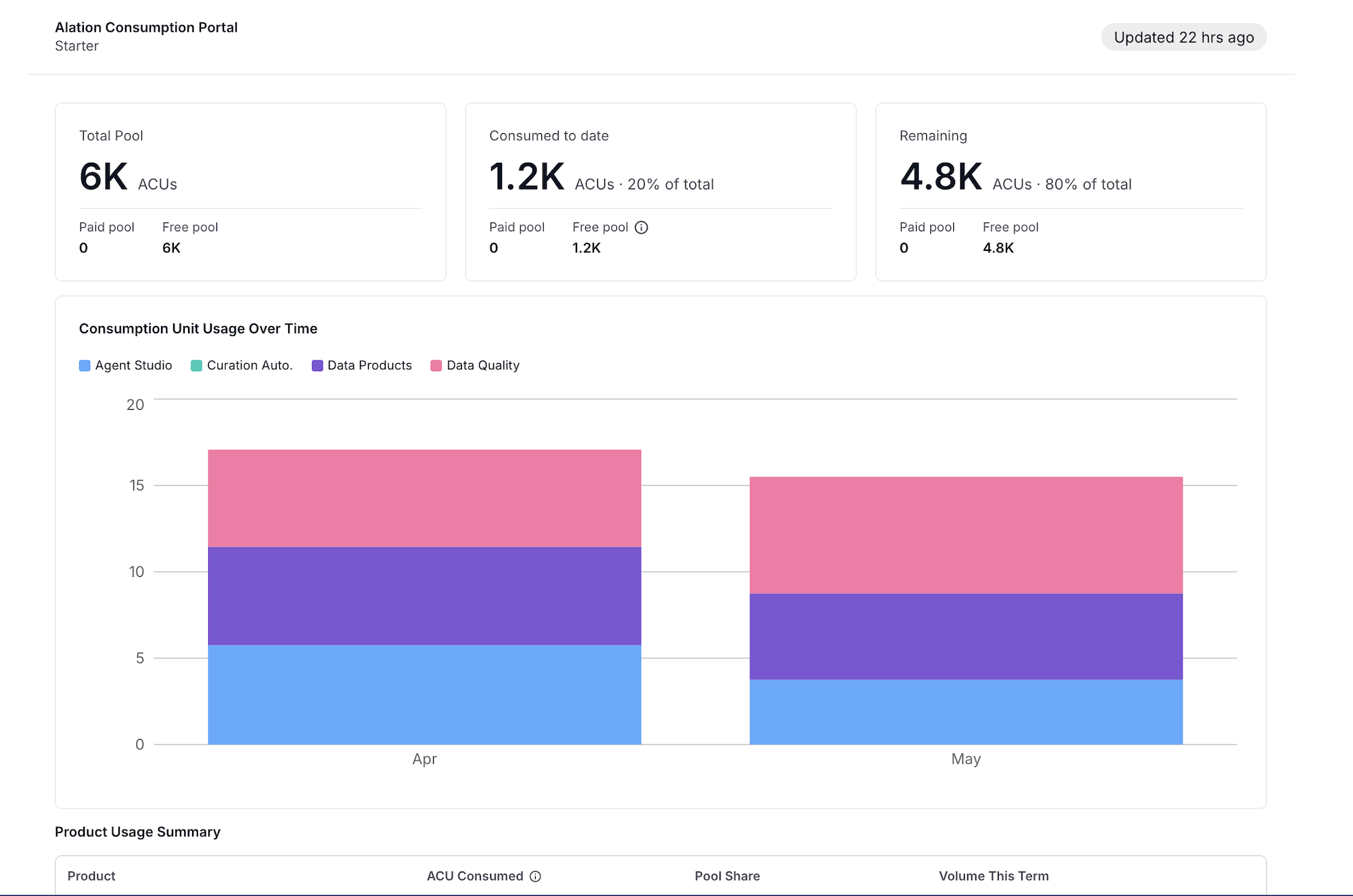
The screenshot below shows the ACU Usage dashboard with a comprehensive view of an organization’s ACU consumption across products and over time.
ACU Usage Overview
Note
ACU usage metrics are not real-time. The usage data is typically refreshed once a day alongside your daily ETL run for Alation Analytics.
The ACU Usage overview page displays several sections to help you understand your organization’s ACU consumption. If you have the Server Admin or Catalog Admin role, you can view ACU usage on the ACU Usage page. This section lets you monitor ACU consumption across products and track usage patterns over time.
The top of the page displays summary metrics, including:
Total pool: Displays the total allocated ACUs for the contract term. Paid ACU packs are available in four tiers: Starter (60,000 ACUs), Growth (120,000 ACUs), Scale (240,000 ACUs), and Enterprise (480,000 ACUs).
- Consumed to date: Displays the ACUs consumed so far with the percentage of your annual pool used.
Free pool: Displays the free ACUs available. Alation checks your free credits first; once exhausted, your paid pool is used. Historically, this also represents ACUs deducted for Curation Automation usage before transitioning to the current licensing model.
Note
Free ACUs are provisioned strictly at the account level, not at the individual user level.
Paid pool: Displays the purchased pool balance.
Remaining: Displays the available ACUs upon usage with the percentage remaining.
Consumption Unit Usage Over Time
The Consumption Unit Usage Over Time chart displays monthly ACU consumption trends for the product, helping you identify usage patterns and trends. Each product is shown in a different color in the stacked bar chart.
Product Usage Summary
The Product Usage Summary table lists all products with their ACU metrics.
Product: Lists all the applicable products: Curation Automation, Data Quality, Agent Studio, Data Products, and Critical Data Manager.
ACU consumed: Total ACUs consumed by the product during the contract term.
Pool share: The percentage of the total ACU pool consumed by this product.
Volume This Term: The total metered actions for each product.
Usage Alerts and Limits
Alation uses a tiered notification and enforcement model to ensure you are never surprised by pool exhaustion.
Feature Limitations When ACU is Exhausted
When ACUs are fully exhausted, you can still navigate the product.
You can access existing configurations, but Alation disables new metered actions to prevent further consumption.
Affected buttons appear grayed out with tooltips explaining why the action is unavailable.
For example, in Data Quality, the following actions are disabled when ACUs are exhausted:
Creating new monitors
Running quality check runs
Other actions that consume ACUs
In Critical Data Manager, ACU exhaustion puts the application into read-only mode. You can still view existing CDEs, standards, and Data Consumptions, but the platform blocks new AI-assisted actions, such as creating a CDE or Data Consumption, until your ACU balance is restored.
Upgrade Prompts
If you try to use a feature that requires ACUs you do not have or if your pool is completely exhausted, an upgrade prompt appears. The prompt explains that the feature requires an upgrade. To restore access, write an email to sales@alation.com to connect to a sales representative about your ACU usage.
Features that display an upgrade prompt include:
Data Product Chat
Other ACU-metered features
All users will see a contextual pop-up explaining why a metered action is blocked if your pool is exhausted.
Existing Subscriptions and Renewals
If you have already purchased an Alation 2.0 product (Curation Automation, Data Quality, Agent Studio, Data Product Marketplace, Critical Data Manager), your existing entitlements and pricing continue exactly as they are until your renewal. At renewal, your existing product entitlements for the five in-scope products will be converted to an ACU pack at a revenue-equivalent rate.
If you have not purchased any of the five in-scope products but you’re a cloud customer, you receive 6,000 free ACUs immediately to explore all five products. If your team decides to purchase, your account team will recommend the right tier based on your usage patterns.
Note
Account-Level Allocation: Free ACUs are provisioned strictly at the account level, not at the individual user level.
Historical Usage Deduction: The historical usage of free Curation Automation credits will be deducted from your free ACU credits. This may result in your free credits appearing to be less than 6,000.