
Generate Automatic Drafts from Schema Drifts (Beta)
Alation Cloud Service Applies to Alation Cloud Service instances of Alation
A data product is built against a specific set of source schemas, tables, and columns. Over time, the underlying source can change. For example, a column is removed, a column’s type changes, or a column is renamed. Schema drift is the gap that opens between the data product’s definition and the current schema recorded in the catalog. Left unaddressed, this drift can break the chats and agents that consume the data product, returning inaccurate results to downstream users.
You can enable Auto-Suggest Improvements on a data product to monitor for schema drift and automatically generate a draft that applies the detected changes to the data product structure.
Before enabling this feature, ensure the data product meets the following requirements:
It has a data contract. The contract can be empty, you do not need to configure schema checks. The contract’s only role is to make the data product eligible for this feature.
It is listed in the marketplace. Drift is evaluated against the listed version.
Without a data contract and a listed version, Alation cannot monitor the data product for schema drift or prepare an Improved Draft.
In this topic:
Prerequisites
You have permission to manage the data product in the Data Products App.
The data product has a data contract. The contract can be empty; schema checks do not need to be configured. For details, see Configure the Data Contract.
The data product is listed in the marketplace. For details, see Data Product Versioning and Marketplace Listing.
Metadata extraction (MDE) is configured on the underlying data source. Alation detects drift from the MDE results, so detection depends on the source’s MDE schedule.
Enable Auto-Suggest Improvements
Metadata extraction triggers the Auto-Suggest Improvements. The data contract only needs to exist for the feature to be active.
Detect drift: When metadata extraction (MDE) completes for the underlying data source, MDE produces a diff between the newly extracted schema and the prior cataloged state. Auto-Suggest Improvements reads this diff for the schemas, tables, and columns that the listed data product references. Each difference is recorded as one of a small set of change kinds: an object added, an object removed, or a column type changed. Because MDE captures only add and remove deltas, not DDL events, a rename appears as the removal of the old name plus the addition of the new name, rather than as a single rename. The catalog is the source of truth: a table that still exists on the database but is excluded from the MDE filter is soft-deleted in the catalog and therefore counts as drift.
Prepare an Improved Draft: Alation generates an improved draft from the listed version of the data product, with the detected changes applied so the improved draft reflects the latest schema. If the data product has no improved draft yet, Alation creates one from the listed version. If an active improved draft already exists, Alation creates one as a peer revision with a lower version number than the active improved draft, and never modifies the active draft.
Surface for review: Alation displays the Improved Draft on the data product so you can review it. After you review the improved draft, it behaves like any other active draft, you can edit it and publish it through the standard data product workflow.
Note
If the data contract has a schema check configured, both that check and Auto-Suggest Improvements are triggered by the same metadata extraction and read the same diff, which is why a contract check failure and an improved draft often appear at the same time. Auto-Suggest Improvements runs independently: it does not wait for the schema check, does not require it to fail, and does not use its definitions.
To turn on Auto-Suggest Improvements:
Open the data product you want to manage.
On the Overview tab, under Data Product Details, turn on the Auto-Suggest Improvements toggle.
The Auto-Suggest Improvements card on the overview shows a Beta label.
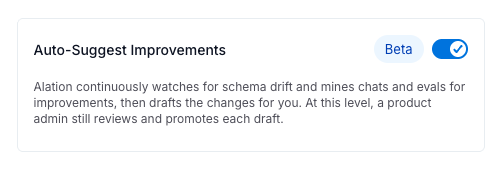
When the setting is on, Alation prepares an Improved Draft whenever it detects schema drift for the data product.
Review the Improved Draft
When drift is detected, an Improved Draft section appears on the Overview tab of the data product with a Review Draft button.

Open the data product.
On the Overview tab, under For You, click Review Draft in the Improved Draft section.
In the Review Draft dialog, review each detected change. The dialog displays a notice that the content is AI-generated and may contain mistakes, so confirm each change before you accept it. Each change shows its change type and the affected object, along with the before and after values.
Choose one of the following:
Reject All Changes: Discard the proposed changes and dismiss the current drift.
Create Active Draft: Open the Create Active Draft dialog. Alation pre-fills the Release Notes field with a summary of every detected change, for example, “Column SKU type updated in ORDERS” or “Column ORDER_ID removed from ORDERS”. Edit the release notes if needed, then click Create Draft to apply the proposed changes to a new active draft of the data product.
After you create the active draft, it behaves like any other active draft of the data product. Refine it, then submit it for approval to replace the listed version:
To edit the draft’s tables, columns, and other settings, see Edit Data Products.
To submit the draft as an update and route it through Marketplace Admin approval, see Update a Listed Version.
Identify the Change Types
Auto-Suggest Improvements detects the following types of schema changes in the source objects that the listed data product references:
Change Type |
Meaning |
|---|---|
Added |
A column or table was added to the source schema that the data product references. |
Removed |
A column, table, or schema that the data product references was removed from the catalog. This includes soft-deletion, which occurs when a table is excluded from the MDE filter even though it still exists on the data source. |
Type Changed |
The data type of a referenced column changed in the source. |
Because MDE detects only additions and removals, a renamed column or table appears as a removal of the old name together with an addition of the new name.