
Curation Automation
Alation Cloud Service Applies to Alation Cloud Service instances of Alation
Overview
Applies from Alation version 2026.2.1.0
Alation’s Curation Automation is an AI-powered curation capability that automates governance rather than relying on manual processes. Curation Automation enables users with access to define rules that curate large volumes of data assets from a central hub. This approach shifts the data management focus from manual, individual edits to a standardized rule-based system. Admins can define governance standards centrally, rather than editing assets individually. These standards are automatically and consistently applied to all current and future assets that match the rules.
Server Admins and Catalog Admins have access by default and can grant access to Source Admins, Stewards, and Composers so those users can create and run their own rules. For details, see Access Curation Automation.
Before you start creating curation rules, familiarize yourself with the key concepts in Curation Automation and understand the various building blocks that make a rule:
Curation Rule
A curation rule is a saved set of instructions defining a specific curation task:
Purpose: Explains why the rule exists.
Scope: Identifies which assets are affected.
Fields: Specifies which metadata fields to populate.
Value Source: Determines whether values are deterministic (fixed) or AI-generated (with the required confidence level).
Reporting and Audit: Measures the rule’s impact on alignment with standards.
Scope
The scope is a flexible selection of RDBMS data source objects, allowing assets to be included or excluded by:
Schema
Table
Column
You can define this selection in two ways for each data source:
Search: Manually search for and select individual schemas, tables, and columns.
Pattern: Match objects by name using conditions (for example, all schemas that start with
public), instead of picking them one by one. This is useful for targeting naming-convention-driven asset sets without manual selection.
You can also apply optional scope filters to narrow the selected objects by custom field values, such as including only columns where Sensitivity Level is High or Compliance Tag contains SOX or HIPAA. For more information, see Define Your Scope.
For file system sources, you can scope by including or excluding directories, files, or file attributes.
Value Sources
Value sources define how the metadata values are derived:
Manual (Fixed): You provide exact, fixed values. For example, Set the Steward field to the group “Professional Services”. Recommended for ownership or stewardship.
AI-generated: Curation agents generate values using catalog context (objects, tags, source comments). Results include a confidence score. Recommended for descriptions and classifications with clear instructions.
Note
For AI-generated fields, you can optionally attach a reference document to provide the agent with source material. Suitable documents include data policies, classification standards, and style guides. This can be useful for governance-related fields where correct values depend on formal organizational standards.
AI Agents
In Curation Automation, AI Agents act as your automated stewards. They are specialized automation components that take your curation knowledge and transform it into a repeatable, auditable, and explainable process. While you establish the governing logic through the rule inputs, the AI agents execute those standards by automatically populating and maintaining metadata across your catalog at scale.
When a rule runs, the AI agent receives an assembled prompt for each object in scope. This prompt has three parts:
Purpose: Your rule-level briefing on industry, domain, data sources, audience, and curation goal. It applies to every object the rule touches.
Field instructions: Per-field guidance on what to write, for whom, and to what standard. Each field in the rule gets its own instruction.
Object context: Automatically assembled from your catalog signals for each object. It includes the object’s title, description, source comments, column names, data types, parent hierarchy, and query activity if Query Log Ingestion is enabled for the data source. You don’t write this: Alation assembles it. Richer catalog context, such as source comments, descriptions, and query history, means better agent output without additional instructions from you.
Catalog Signals
Curation quality is shaped not only by your rule inputs but also by the richness of the metadata already present in your catalog. Three signals have the most impact:
Source comments: Comments written by developers in the source database (column comments, table remarks) are ingested into Alation and passed to the AI agent automatically. Richer source comments produce better output before you write a single rule instruction.
Description quality: When a rule curates multiple fields on the same object, Alation always generates the Description first and passes it as context when generating all remaining fields. A well-curated description improves every other field on the same object. If your descriptions are not yet high quality, include Description in your rule alongside your other fields.
Query Log Ingestion (QLI): When QLI is enabled for a data source, Alation ingests the SQL queries that were run against this source, including joins, filters, and column usage patterns. This information is passed to the agent as behavioral context. The difference in output quality between a source with rich query history and one without may be significant.
AI Actions and Consumption Units
Curation Automation tracks AI usage against one of two entitlement models, depending on what your tenant is provisioned with:
AI actions (curation pack): For Alation Cloud Service tenants with a purchased Curation Automation pack. An AI action is defined as an Alation AI Agent filling an AI-generated value for a single field in a single object in a rule.
Alation Consumption Units (ACU): For Alation Cloud Service tenants on the centralized ACU pool. Curation Automation draws from your shared ACU pool, alongside other ACU-metered Alation products. For details on the ACU model, the metered rate for Curation Automation, and the ACU dashboard, see Alation Consumption Unit (ACU) Usage.
Curation Automation detects your entitlement type automatically and displays the corresponding labels and balances throughout the rule preview and execution flow.
Before running a rule, based on the defined object scope and the number of empty fields within that scope, Curation Automation calculates and displays the estimated maximum cost on the Preview screen of the rule creation wizard:
For AI actions tenants, this appears as the estimated number of AI actions and the estimated actions remaining after the run.
For ACU tenants, this appears as the estimated number of AI fields, the estimated ACU consumption for the run, and the estimated ACU balance remaining after the run.
After the rule completes successfully, the actual usage is calculated based on the number of fields successfully updated by AI, and the remaining balance is displayed.
Alation does not count manually curated fields towards your AI action or ACU usage. Fields that you populate using fixed value sources do not consume from your AI action allotment or ACU pool. You can create rules that combine both AI-generated and manual fields. Only the successfully updated AI-generated fields are deducted. If a rule fails mid-run, only completed updates are counted.
Get Started with Curation Automation
Curation Automation is available in the New User Experience on Alation Cloud Service instances starting with version 2026.2.1.0.
Note
If you do not see this feature, contact Alation Support to enable it.
For information on pricing details, contact your Alation Account Manager.
Important
The available balance depends on your tenant’s entitlement type:
AI actions tenants: Each tenant is provided with 100,000 free AI Actions and Consumption Units, meaning the first 100,000 are free, and Alation will charge for each AI action thereafter. To replenish your AI action balance, contact your Alation Account Manager.
ACU tenants: Curation Automation consumes from your tenant’s shared ACU pool. To increase your ACU allocation, contact your Alation Account Manager. For pool size, consumption, and notification thresholds, see Alation Consumption Unit (ACU) Usage.
If you don’t have enough AI actions or ACU to run a curation rule, Alation prevents you from executing the rule and displays a message with the amount required versus your available balance. The message title is Insufficient AI Actions for AI actions tenants and Insufficient ACU Balance for ACU tenants. You can still create, edit, save, and preview curation rules; however, you cannot execute rules that require AI-generated curation until you replenish your balance. Rules that use only manual curation methods are not affected, and you can still execute those rules.
Access Curation Automation
By default, only Server Admins and Catalog Admins can access Curation Automation. A Server Admin or Catalog Admin can grant access to Source Admins, Stewards, and Composers so they can create and run their own rules. For details, see Configure Access to Curation Automation. When a rule runs, Curation Automation honors the field and object permissions of the user who runs it; for details, see Configure Permissions for Curation Automation.
To access Curation Automation:
Click the Curate and Govern icon from the left-side navigation panel of Alation user interface to open the Governance page.
Select the Curation Automation option from the Curate section.
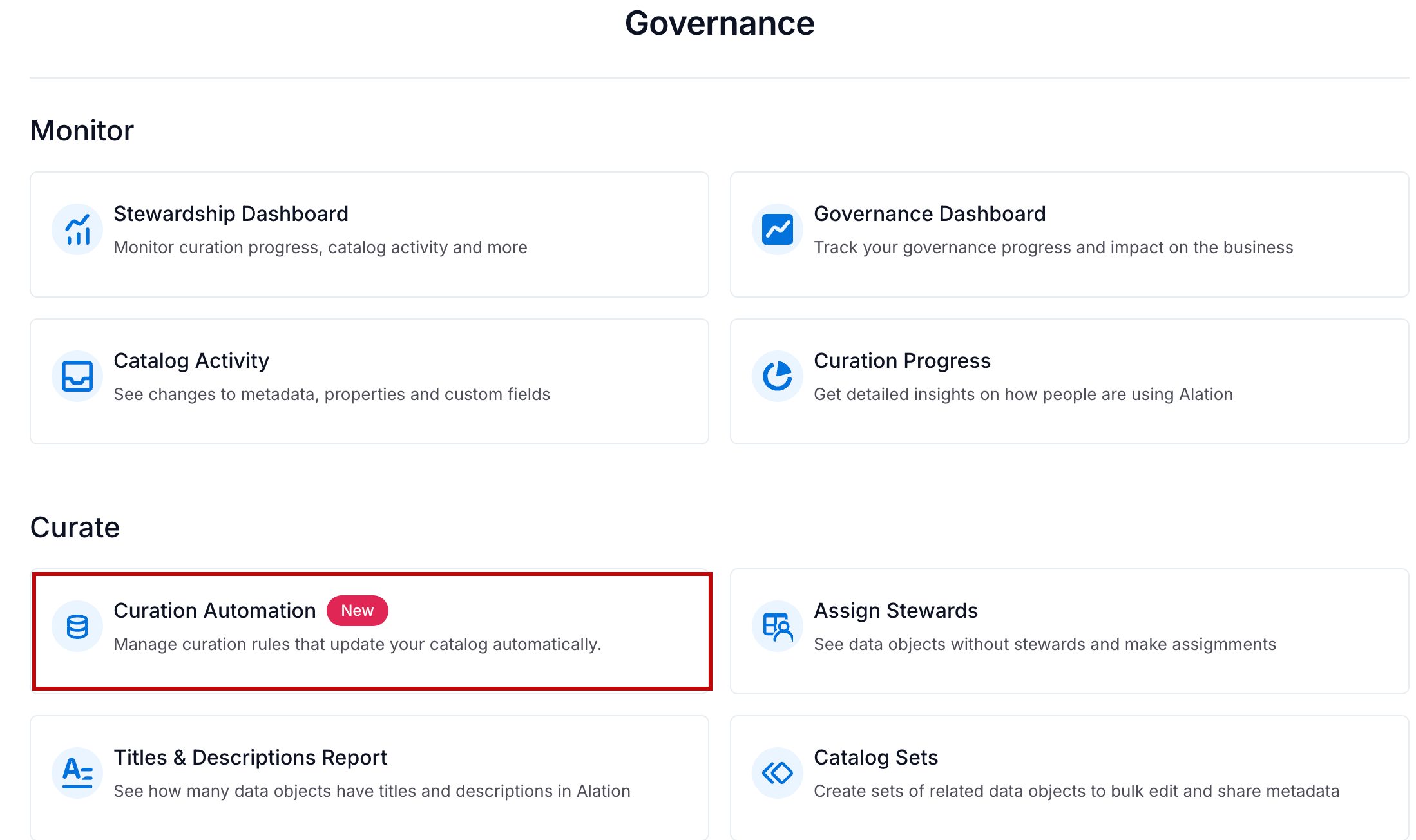
The Curation Automation page opens.
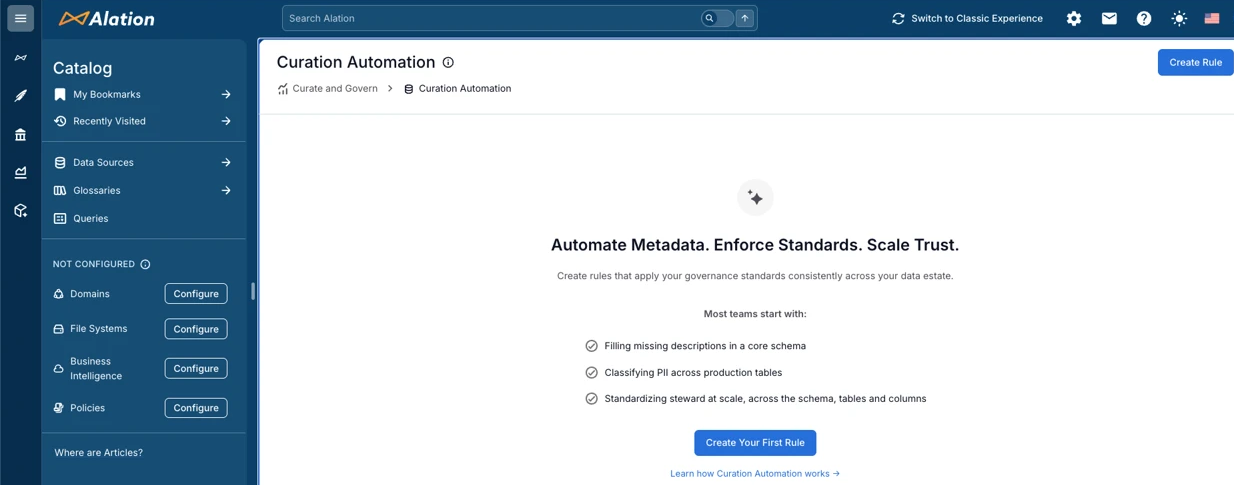
Overview Dashboard
When you have at least one curation rule, the Curation Automation page displays the following tabs:
Overview: Provides a high-level metrics (Summary Metrics) dashboard and a visual representation of the aggregate impact of your curation rules (Curation Impact Chart). This is the default view.
Curation Rules: Displays a list of all existing rules and lets you manage them. For details, see Manage Curation Automation.
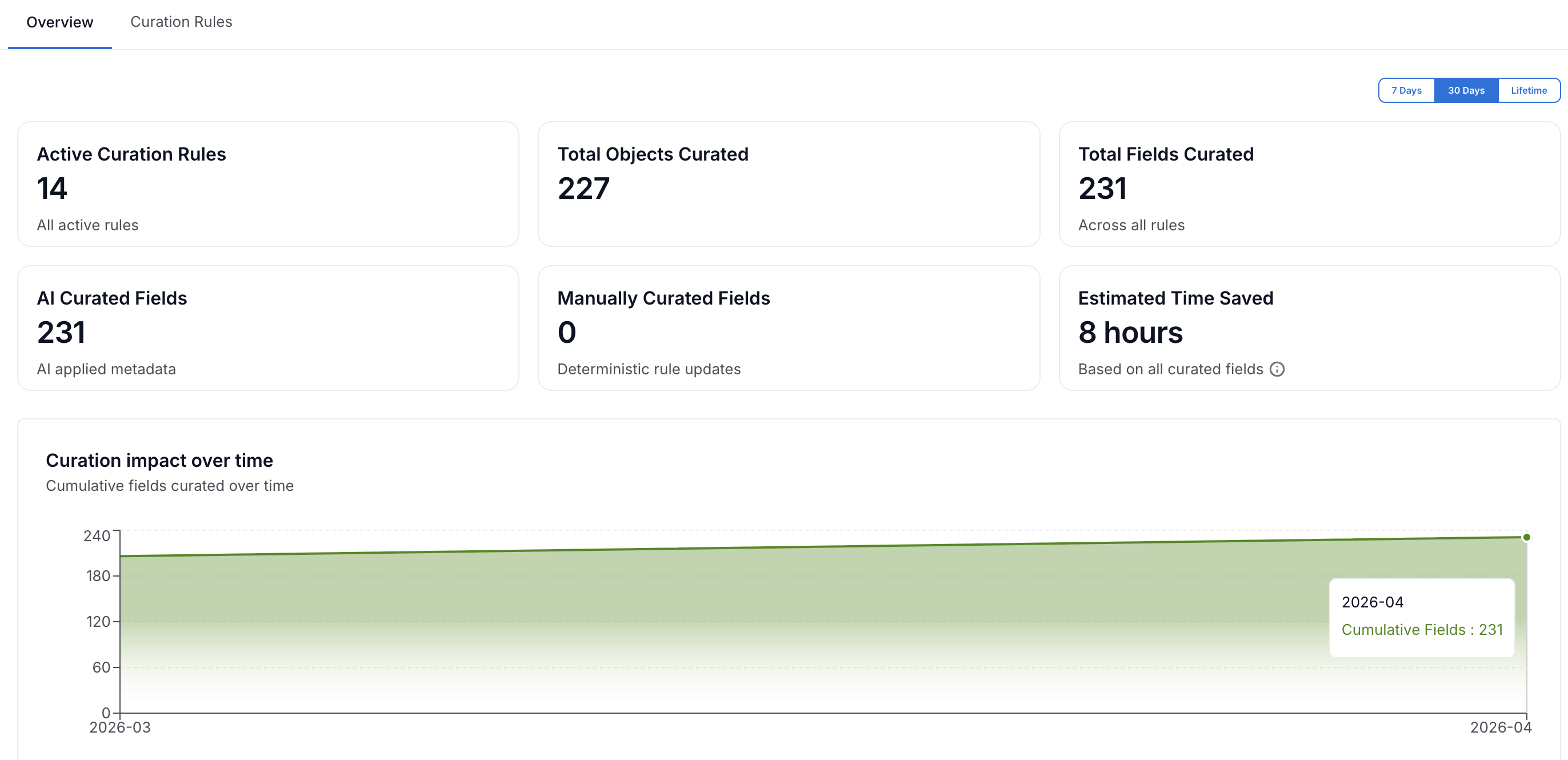
The following screenshot shows the Overview tab of the Curation Automation page with multiple curation rules.
Summary Metrics
The Overview tab displays real-time metrics that show the impact of your automation. You can filter these metrics by 7 Days, 30 Days (default), or Lifetime using the date filter.
Metric |
Description |
|---|---|
Active Curation Rules |
The number of active rules in the Alation’s Curation Automation. |
Total Objects Curated |
The number of data objects (schemas, tables, and columns) with at least one field updated by curation rules. |
Total Fields Curated |
The number of objects successfully processed by curation rules. If any field in a rule is skipped due to low confidence, the object is not included in this count. |
AI Curated Fields |
The number of fields populated using AI-generated values. |
Manually Curated Fields |
The number of fields populated using fixed values. |
Estimated Time Saved |
Estimated time saved through automated curation compared to manual metadata updates (assumes two minutes per field). |
Curation Impact Chart
The Curation impact over time chart visualizes the growth of curated fields versus the timeline selected in your date filter. As your automation rules run, the trend line reflects the cumulative increase in metadata updates. You can hover over any data point on the line to see the specific total number of fields curated for that date.